Frontend & Mobile Application Development
From HTML, CSS and JavaScript to browser rendering, component architecture, responsive interfaces, native apps, Flutter and store releases.
The frontend is what users see, touch and operate.
For the web, every framework eventually produces HTML, CSS and JavaScript that the browser can execute.
HTML
Structure and meaning: headings, navigation, forms, articles and controls.
CSS
Layout and presentation: spacing, typography, colour and responsive behaviour.
JavaScript
Events and behaviour: API calls, validation, state and screen updates.
Backend API
Authoritative data, authentication, permissions and business rules.
<button id="load">Load products</button>
<ul id="products"></ul>

<script>
document.querySelector("#load").onclick = async () => {
  const response = await fetch("/api/products");
  const products = await response.json();
  document.querySelector("#products").innerHTML =
    products.map(p => "<li>" + p.name + "</li>").join("");
};
</script>A URL becomes files, browser structures and finally pixels.
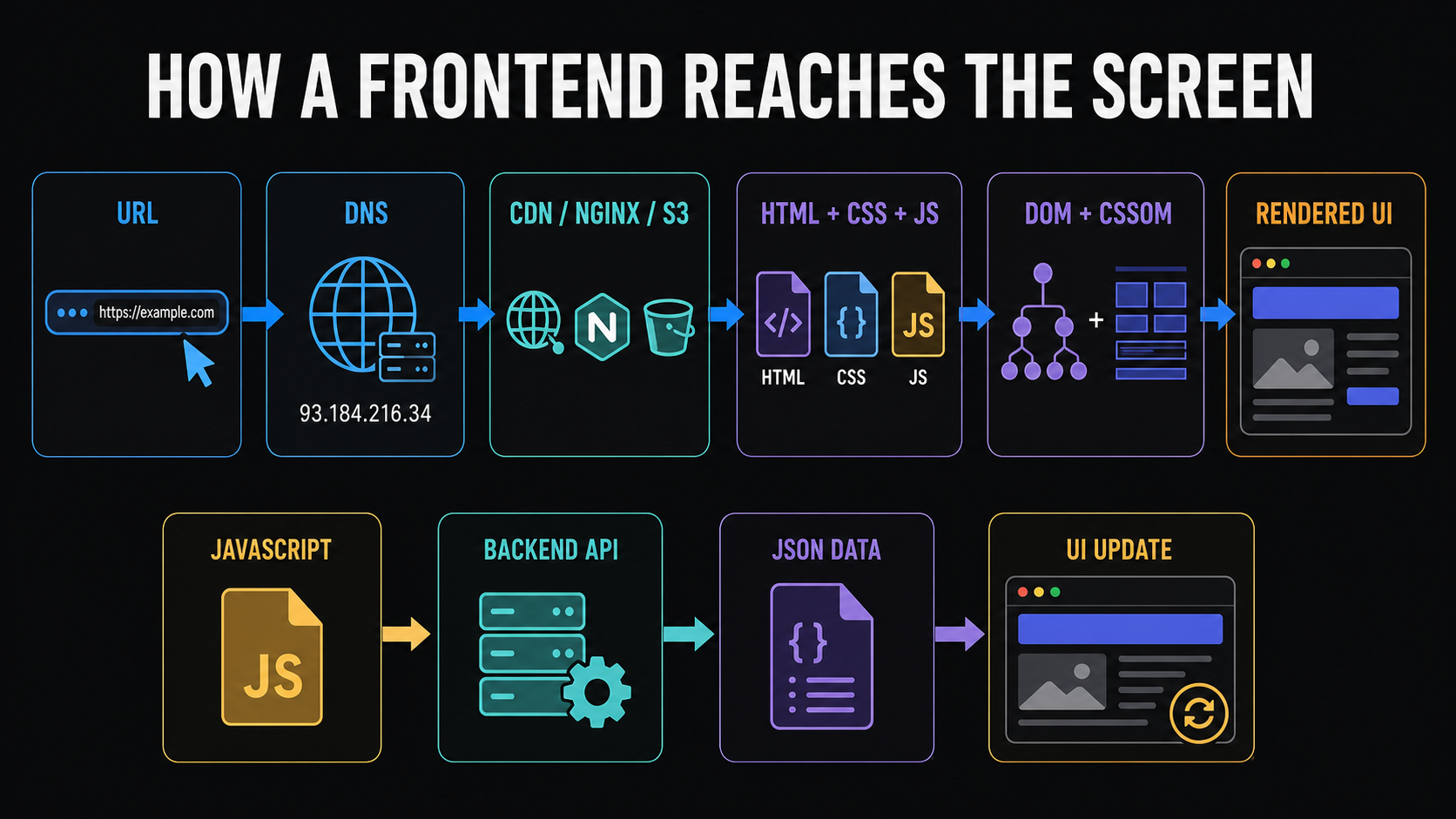
Static delivery
The browser downloads HTML, styles, JavaScript, images and fonts from a static host or CDN.
Dynamic data
JavaScript sends HTTPS requests to a backend API, receives JSON and updates visible state.
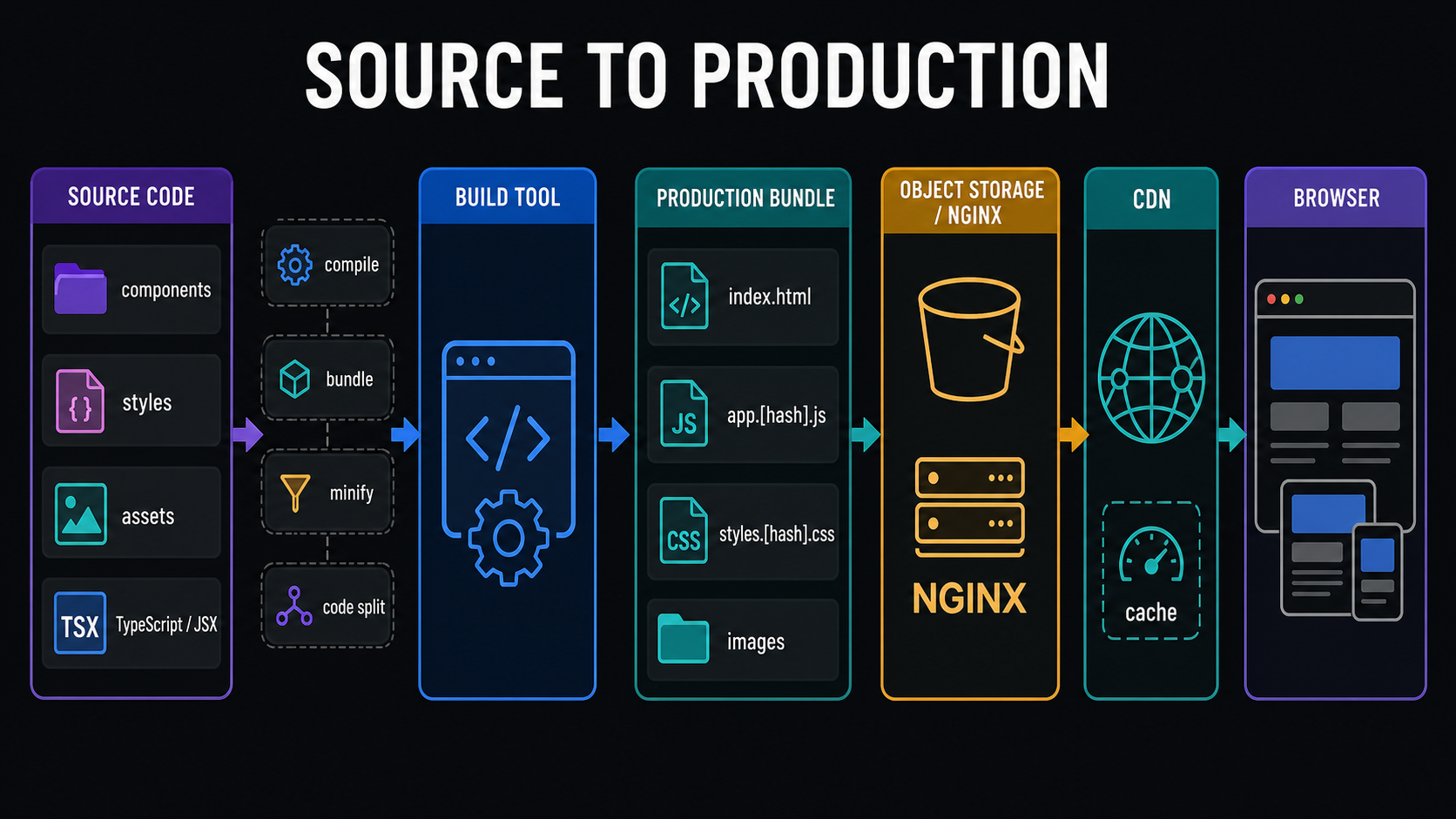
Developers write source modules; users receive production bundles.
Source
Components, TypeScript or JSX, styles, tests and assets in a repository.
Build
Compile, bundle, tree-shake, minify, code-split and generate content hashes.
Deploy
Place generated files on Nginx, object storage or a frontend platform, then distribute through a CDN.
dist/
├── index.html
├── assets/app.a82fd9.js
├── assets/styles.91bc7.css
├── assets/vendor.27ac1.js
└── assets/logo.8b19.pnglocation /assets/ {
try_files $uri =404;
expires 1y;
add_header Cache-Control "public, immutable";
}
location / {
try_files $uri $uri/ /index.html;
}
location /api/ {
proxy_pass http://backend:8080/;
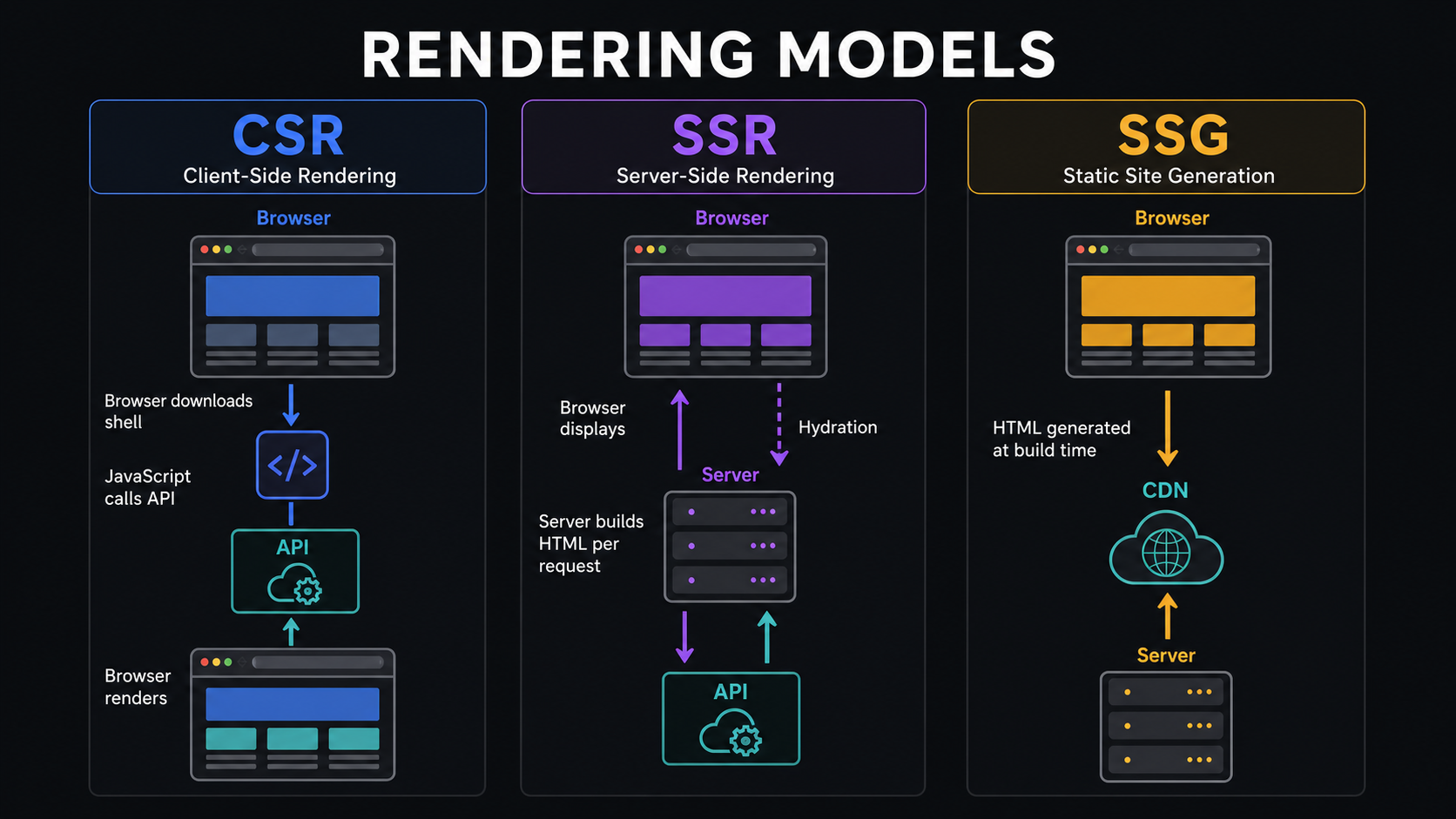
}Rendering is about where and when HTML is produced.
CSR
The browser receives a shell. JavaScript fetches data and builds most of the page.
SSR
A server produces HTML per request; client JavaScript hydrates it for interaction.
SSG
The build produces HTML ahead of time and the CDN serves it quickly.
Frameworks organize complexity; they do not replace the web platform.
The transferable ideas are components, state, events, routing, services, rendering and build tooling.
| Option | High-level model | Useful perspective |
|---|---|---|
| Plain JavaScript | Direct browser APIs | The foundation |
| jQuery | Imperative DOM manipulation | Existing and legacy interfaces |
| React | Composable UI library | Components driven by props and state |
| Angular | Opinionated framework | Components, DI, services, forms and routing |
| Vue | Progressive framework | Templates and reactive UI |
| Svelte | Compiler-oriented framework | More work at build time |
count += 1;
document.querySelector("#count").textContent = count;function Counter() {
const [count, setCount] = useState(0);
return <button onClick={() => setCount(count + 1)}>
{count}
</button>;
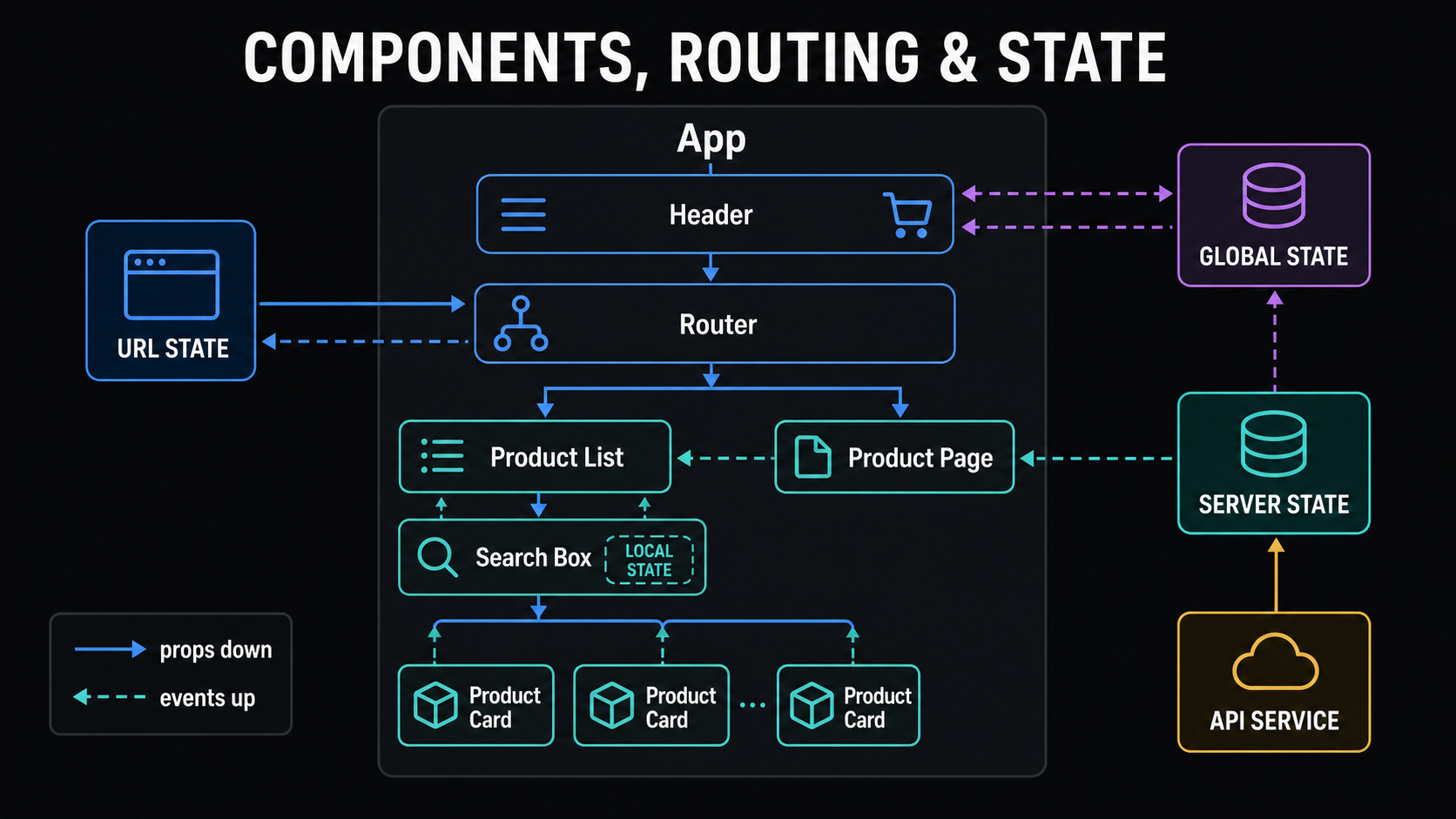
}Nested components, routing and state form the application skeleton.
Props down
A parent provides data and configuration to a child component.
Events up
A child reports a click, selection or edit to its owner.
State has a home
Keep state as close as practical to the components that need it.
| State type | Example | Natural home |
|---|---|---|
| Local | Modal open | Component |
| Form | Email and errors | Form |
| URL | Search and page | Router |
| Server | API products | Query/cache layer |
| Global | User, theme, cart | Provider or store |
const routes = [
  { path: "/", element: <HomePage /> },
  { path: "/products", element: <ProductList /> },
  { path: "/products/:id", element: <ProductDetails /> },
  { path: "/account", element: <RequireLogin><Account /></RequireLogin> }
];React and Angular express many of the same core concepts.
React
Flexible UI library. Components are JavaScript functions, JSX describes UI, hooks manage state and effects, and ecosystem libraries provide routing and server-state tools.
Angular
Integrated framework. Components use templates, services use dependency injection, and routing, forms and HTTP support follow framework conventions.
function ProductPage() {
  const [products, setProducts] = useState([]);
  const [status, setStatus] = useState("loading");

  useEffect(() => {
    fetch("/api/products")
      .then(r => r.ok ? r.json() : Promise.reject())
      .then(data => { setProducts(data); setStatus("success"); })
      .catch(() => setStatus("error"));
  }, []);

  if (status === "loading") return <p>Loading…</p>;
  if (status === "error") return <p>Could not load products.</p>;
  return <ProductList products={products} />;
}@Component({
selector: "app-product-card",
template: "<button (click)='selected.emit(product.id)'>" +
"{{ product.name }}</button>"
})
export class ProductCardComponent {
@Input() product!: Product;
@Output() selected = new EventEmitter<number>();
}Responsive design is a baseline capability, not a later patch.
.product-grid {
  display: grid;
  grid-template-columns: 1fr;
  gap: 1rem;
}

@media (min-width: 48rem) {
  .product-grid { grid-template-columns: repeat(2, 1fr); }
}

@media (min-width: 72rem) {
  .product-grid { grid-template-columns: repeat(4, 1fr); }
}
Layout
Flexible grids, images and containers.
Interaction
Touch targets, keyboard access and clear focus.
Content
Long text, localization, empty and error states.
Devices
Portrait, landscape, tablets and foldables.
Mobile development offers four fundamentally different approaches.
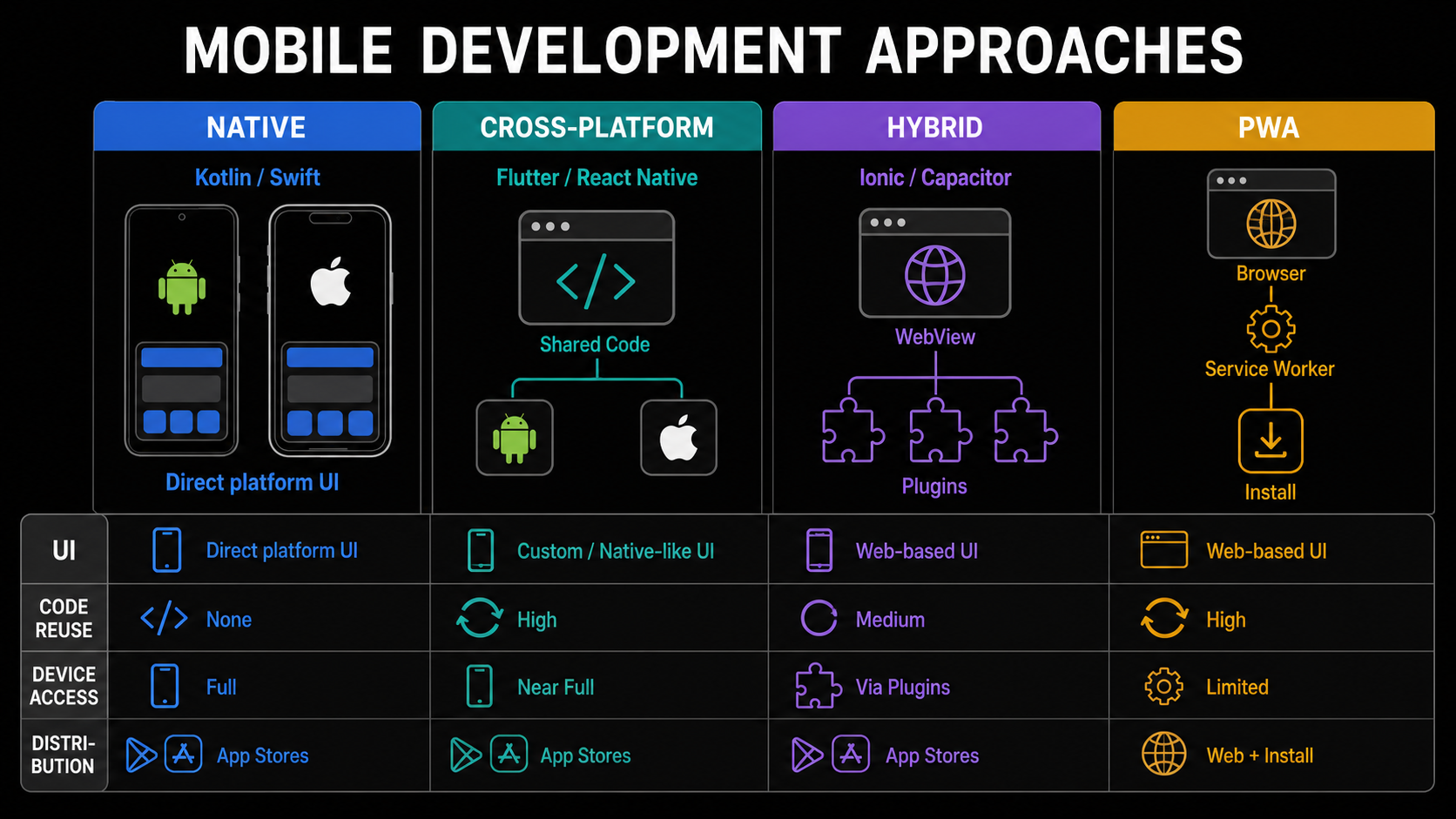
| Approach | Technologies | Best considered when |
|---|---|---|
| Native | Kotlin/Compose; Swift/SwiftUI | Deep platform integration and platform-first UX |
| Cross-platform | Flutter; React Native | Shared product code across Android and iOS |
| Hybrid | Ionic; Capacitor | Maximum web reuse with plugin device access |
| PWA | Web platform; service worker | Web distribution plus install and offline capabilities |
Mobile development continues well beyond drawing screens.
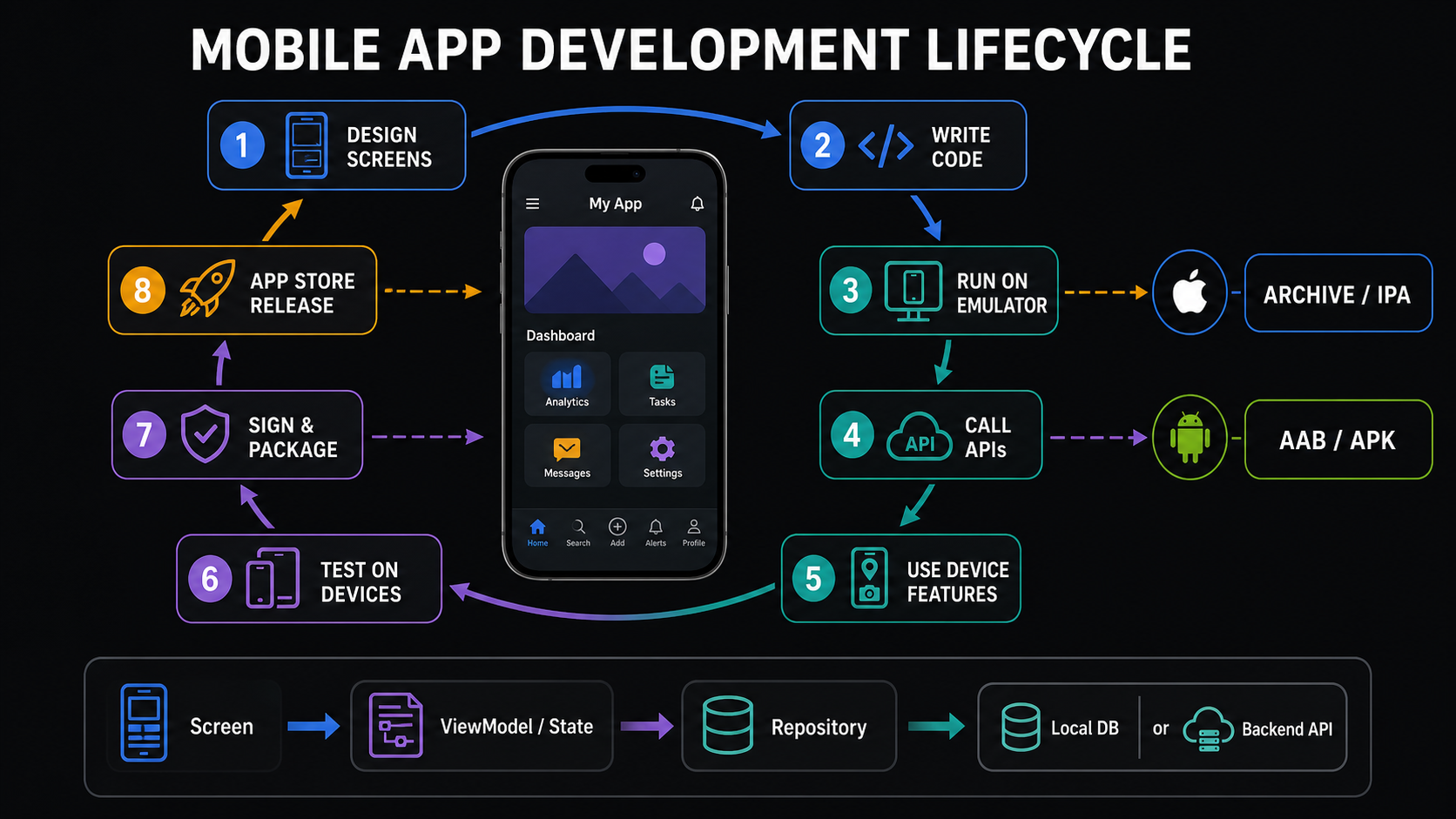
Native development uses the platform's language, UI toolkit and lifecycle.
Android
Android Studio, Kotlin, Jetpack Compose, Navigation, ViewModel, repositories, Room, manifest permissions, emulator/device testing, signed AAB or APK and Play release tracks.
iOS
Xcode, Swift, SwiftUI, NavigationStack, observable state, local persistence, entitlements, privacy descriptions, simulator/device testing, certificates and App Store Connect.
@Composable
fun ProductScreen(state: ProductUiState) {
  when {
    state.loading -> CircularProgressIndicator()
    state.error != null -> Text(state.error)
    else -> LazyColumn {
      items(state.products) { product ->
        ListItem(headlineContent = { Text(product.name) })
      }
    }
  }
}struct ProductListView: View {
let products: [Product]
var body: some View {
NavigationStack {
List(products) { product in
NavigationLink(product.name) {
ProductDetailsView(product: product)
}
}
}
}
}Cross-platform and hybrid tools share code in different ways.
Flutter
Dart widgets describe a shared UI rendered by Flutter. Plugins or platform channels connect to native services.
React Native
React's component and state model targets mobile components and native capabilities rather than HTML elements.
Hybrid
HTML, CSS and JavaScript run in a native container; plugins expose capabilities such as camera and location.
class ProductCard extends StatelessWidget {
  final Product product;
  const ProductCard({required this.product, super.key});

  Widget build(BuildContext context) {
    return Card(
      child: ListTile(title: Text(product.name))
    );
  }
}function ProductCard({ product, onPress }) {
return (
<Pressable onPress={() => onPress(product.id)}>
<Text>{product.name}</Text>
<Text>₹{product.price}</Text>
</Pressable>
);
}Mobile engineering must handle interruption, permission and unreliable networks.
Navigation
Stacks, tabs, drawers and deep links must preserve expected back behaviour.
Lifecycle
Foreground, background, suspension and termination can interrupt work at any moment.
Permissions
Explain why a capability is needed and design granted, denied and unavailable paths.
async function loadProducts() {
  render(await localDatabase.products.all());

  try {
    const fresh = await api.products.list();
    await localDatabase.products.replaceAll(fresh);
    render(fresh);
  } catch {
    showOfflineIndicator();
  }
}Every client has a different production artifact and delivery path.
| Target | Artifact | Distribution |
|---|---|---|
| Web | HTML, CSS, JavaScript and assets | Nginx, object storage, CDN or managed platform |
| Android | APK or Android App Bundle | Google Play or managed distribution |
| iOS | Signed archive/application package | App Store Connect or managed distribution |
Before release
Environment, identifiers, versions, signing, permissions, privacy metadata and device tests.
During release
Store submission, review, staged rollout, compatibility and rollback planning.
After release
Crash reporting, performance, analytics, feedback and backward-compatible APIs.
Final mental model
- The browser consumes HTML, CSS and JavaScript.
- Source becomes an optimized production bundle.
- Components, state, events, routing and services transfer across frameworks.
- Responsive web and installed mobile apps are different delivery models.
- Mobile engineering includes device lifecycle, permissions, offline data, signing and store distribution.
- Web and mobile clients can share backend APIs while keeping platform-specific experiences.